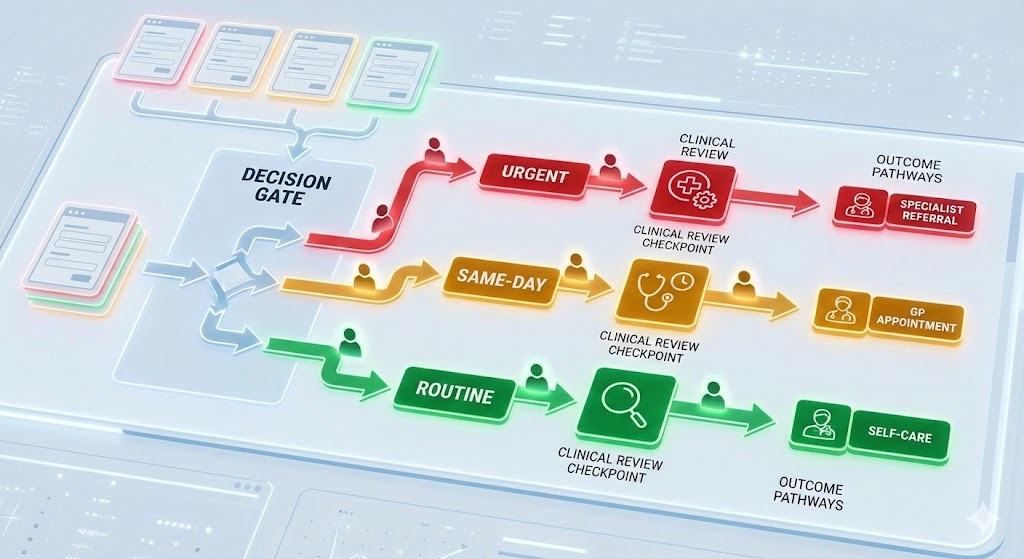
Why Online Consultations Need Clinical Safety Oversight
Online consultation platforms in GP practices carry four main clinical safety risks: delayed triage where requests sit unreviewed while conditions worsen, missed red-flag symptoms buried in free-text submissions, unclear follow-up where patients do not understand next steps, and lost requests from system failures or staff oversight. Safe use requires mapping your end-to-end workflow, setting explicit time-based triage categories with escalation triggers, configuring platform red-flag alerts and testing them regularly, running twice-daily operational huddles, and conducting a DCB0160 clinical safety assessment specific to your deployment. Online consultation platforms are digital health systems and fall under DCB0160.
Online consultations help manage demand, but they introduce specific clinical safety risks: delayed triage, missed red-flag symptoms, unclear follow-up, and lost requests. Without tight controls, these risks can cause patient harm.
Online consultation platforms are digital health systems, which means they fall under DCB0160. You need to assess the risks specific to how you use them in your practice and implement controls to manage those risks.
This guide shows the practical steps that work. It assumes you understand the basics—if you do not, start with:
- A Simple Guide to DCB0160
- How to Conduct a DCB0160 Assessment
- What is a Digital Clinical Safety Management System?
The Main Clinical Safety Risks
Online consultations create these common hazards:
Delayed triage: Requests sit in a queue unreviewed while the patient's condition worsens.
Missed red-flag symptoms: Automated triage or busy clinicians miss chest pain, severe breathlessness, or safeguarding concerns buried in free text.
Unclear follow-up: Patient does not understand next steps, misses appointments, or waits for a callback that never comes.
Lost requests: System failures, configuration errors, or staff oversight mean a request is never triaged.
Your controls must address these specific risks in your workflow.
Map Your End-to-End Workflow
Before you can identify controls, understand how requests flow through your practice:
Step 1: Request submission – Patient completes a form capturing symptoms, clinical information, consent, and preferred contact method.
Step 2: Initial triage – Automated checks flag red-flag symptoms. Staff review the request and assign priority.
Step 3: Clinical decision – A clinician allocates the request to urgent call, routine appointment, self-care advice, or alternative service.
Step 4: Follow-up actions – Book appointments, send messages, issue prescriptions, or make referrals.
Step 5: Closure – Confirm the patient received the response and record outcomes in the clinical system.
Map this on a single page so all staff—reception, triage nurses, duty GPs—understand how requests flow and where bottlenecks occur.
Set Clear Triage Rules
Triage rules must be explicit, documented, and followed consistently.
Define time-based categories with specific response times:
- Urgent: Response within two hours (phone contact)
- Same-day: Within the session or by close of business
- Routine: Within two working days
- Administrative: Within five working days
Define escalation triggers that default to immediate phone contact:
- Chest pain, severe breathlessness, suspected stroke
- Safeguarding concerns (children, vulnerable adults)
- Mental health crises, suicidal ideation
- Severe pain, uncontrolled bleeding
Assign named reviewers on a rota. Each session needs a trained triage clinician with clear cover arrangements for absence. If the designated clinician is unavailable, the backup must be automatic and documented.
Include a daily "second look" list for amber cases that might deteriorate overnight. A senior clinician reviews these before close of business.
Document these rules in your DCB0160 hazard log and make triage standards part of clinical governance minutes.
Configure the Platform for Safety
Platform configuration is a control measure. Get it wrong and you increase risk.
Enable automated red-flag alerts: The system should create immediate alerts or tasks when patients report red-flag symptoms. Test these regularly—automated alerts that fail silently are worse than no automation.
Align forms with clinical standards: Use NICE clinical knowledge summaries to design forms that capture required information consistently. If your form does not ask about chest pain characteristics, you cannot triage chest pain safely.
Set response templates: Include expected timeframes, safety-netting advice, and instructions for urgent care. Templates reduce variation and ensure patients know what to do if their condition changes.
Integrate with your EPR: Triage notes, actions, and follow-up tasks must be recorded automatically in the patient record. If integration fails, you lose clinical context and create safety gaps.
Test configuration after every supplier update. Log checks in your safety file and report failures to your Clinical Safety Officer.
Communicate Clearly With Patients
Patient communication is part of your control strategy.
Display clear guidance on your website:
- How online consultations are triaged
- Response times for each priority level
- When to use 999 or 111 instead
- What to do if you have not heard back within the expected timeframe
Send confirmation messages for every submission. Include an emergency message ("If your condition worsens, call 999") and a contact number for changes or cancellations.
Use plain language and offer alternative routes for patients with limited digital literacy, language barriers, or disabilities (telephone triage, translation support, in-person consultations).
Run Daily Operational Controls
Controls only work if they are followed. Build operational disciplines:
Dashboard review: Monitor a live list of open requests showing age, priority, and assigned clinician. The dashboard should make overdue requests immediately visible.
Twice-daily huddle: Brief stand-up meeting to check overdue items, escalate red flags, and share handover notes. This takes 5-10 minutes but catches requests that are slipping through gaps.
Task ageing rules: Investigate any request older than your agreed timeframe. Contact patients proactively if delays occur. Do not wait for them to chase you.
Weekend and bank holiday cover: Decide whether submissions are switched off or rerouted to out-of-hours services. Update patient-facing messages accordingly. Do not leave online submissions open if no one is monitoring them.
Monitor Quality and Outcomes
Track a focused set of metrics to confirm your controls are working:
- Volume of submissions by category and day (to spot capacity issues)
- Number of urgent escalations and time to clinician contact
- Incidents, near misses, and complaints linked to online consultations
- Duplicate contacts (patient calls again because they have not heard back)
- Staff workload (triage time per session) to spot burnout risks
Discuss results monthly in governance meetings. If metrics worsen, investigate whether controls have failed or need strengthening.
Share highlights with your Primary Care Network (PCN) and commissioners to demonstrate you are managing risk systematically.
Support Staff to Use the System Safely
Staff need training, reference materials, and psychological safety to report issues.
Provide initial and refresher training covering:
- Triage protocols (what is urgent, what can wait, what needs escalation)
- How to use the system (where alerts appear, how to assign tasks)
- Escalation routes (who to contact when unsure)
Create quick-reference guides for reception and clinical staff. Store them next to the safety log so they are easy to find under pressure.
Brief locums and temporary staff before their first session. Include contact details for help and a simplified workflow diagram.
Encourage staff to report friction via the safety log. If the system is hard to use or controls are being skipped, your CSO needs to know so they can update the hazard log and adjust controls.
If you want a Clinical Safety Officer to assess your online consultation workflow, ours can review the triage rules and configuration you have mapped, and record the hazards and controls in a DCB0160 hazard log. Send us an enquiry naming the platform, and we will reply within one business day.
Common Pitfalls
Opening forms when you cannot respond: If you are closed, switch off online submissions or reroute them to out-of-hours services. Do not leave patients waiting days for a response they expected within hours.
Assuming automation catches everything: Automated triage is a helpful tool, not a replacement for clinical judgement. Always combine automated checks with clinician review.
Forgetting to document decisions: Record triage outcomes and advice in the patient record. If something goes wrong, you need evidence of what was said and decided.
Ignoring accessibility: Patients with limited digital literacy or disabilities cannot use online consultations safely without alternative routes. Provide options.
Action Checklist
- Map your end-to-end online consultation workflow
- Set explicit triage rules with time-based categories and escalation triggers
- Configure platform red-flag alerts and test them regularly
- Publish patient-facing information about response times and emergency routes
- Monitor dashboards daily and hold twice-daily huddles to clear backlogs
- Track metrics monthly and update controls if incidents or complaints increase
- Provide staff training and quick-reference guides
- Brief locums and temporary staff before they start
- Conduct a DCB0160 assessment for your online consultation platform
Resources to Bookmark
- How to Conduct a DCB0160 Assessment – Step-by-step process
- What is a Clinical Safety Officer? – The role leading your assessments
- NHS England – Online and Video Consultation Guidance
- RCGP – Online Consultation Toolkit
Frequently Asked Questions
Do online consultation platforms require a DCB0160 assessment?
Yes. Online consultation platforms are digital health systems that directly affect patient triage, clinical decision-making, and follow-up actions. Under DCB0160, your practice must assess the deployment-specific risks — how requests are triaged, how red-flag symptoms are identified, what happens when requests are delayed or lost, and how follow-up is managed. The vendor's DCB0129 compliance covers the platform's design safety but does not assess how it operates in your practice.
What are the main clinical safety risks of online consultations?
Four main risks: delayed triage where requests sit unreviewed while conditions worsen, missed red-flag symptoms buried in free-text submissions that automated systems or busy clinicians fail to catch, unclear follow-up where patients do not understand next steps or wait for callbacks that never come, and lost requests from system failures, configuration errors, or staff oversight. Your controls must address all four risks explicitly.
How should urgent online consultation requests be handled?
Urgent requests — chest pain, severe breathlessness, suspected stroke, safeguarding concerns, mental health crises — must trigger immediate phone contact, not a text response. Configure your platform to create automatic alerts for red-flag symptoms and route them directly to a duty clinician. Set an explicit two-hour response time for urgent requests and ensure named clinician cover is in place for every session, including bank holidays and weekends.
What happens if online consultations are open outside staffed hours?
This is a significant safety risk. If submissions are accepted when no one is monitoring them, requests queue without triage and patients believe they have been seen. Either switch off online submissions outside staffed hours with a clear message directing patients to 111 or 999, or reroute submissions to an out-of-hours service that can triage them. Never leave online submissions open if no one is monitoring them.
How often should online consultation controls be reviewed?
Monitor daily using a live dashboard showing open requests by age, priority, and assigned clinician. Hold twice-daily huddles to clear backlogs and escalate overdue items. Review metrics monthly in governance meetings — submission volumes, response times, escalations, incidents, and repeat contacts. If metrics worsen, investigate whether controls have failed or capacity is insufficient. Conduct a formal DCB0160 reassessment whenever the platform is updated or your triage process changes.
Key Takeaways
Safe online consultations rely on disciplined triage, clear patient communication, and continuous monitoring. The main risks are delayed triage, missed red-flag symptoms, unclear follow-up, and lost requests.
Your controls must be explicit, documented, and followed consistently. Configuration, operational disciplines, and staff training are all part of your control strategy.
Monitor metrics monthly to confirm controls are working. If incidents or complaints increase, investigate whether controls have failed or need strengthening.