When to Use This Guide
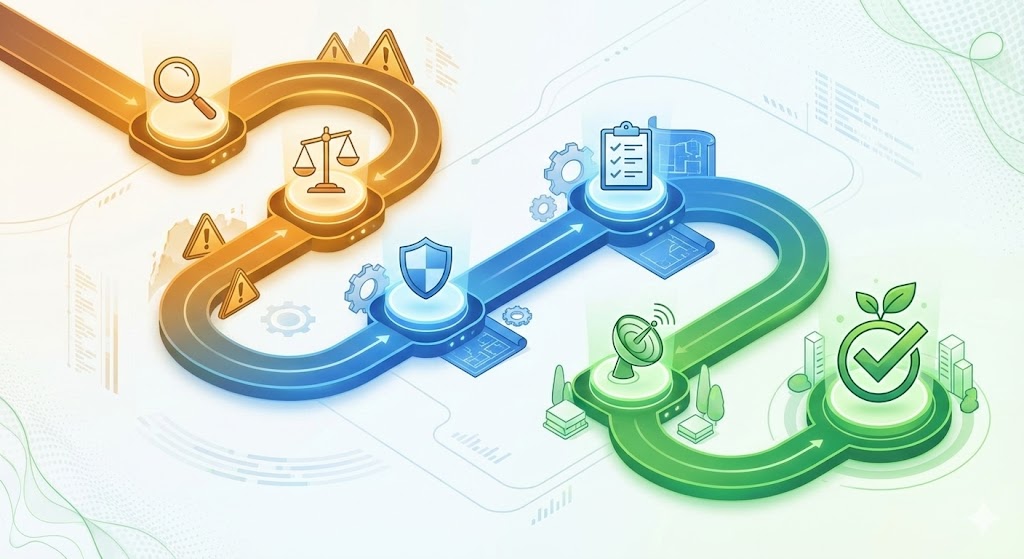
A DCB0160 clinical safety assessment follows six steps: identify every hazard that could cause harm to patients from a digital system, assess the likelihood and severity of each hazard using a risk matrix, identify preventive, detective, and mitigating controls for each risk, implement those controls through training, configuration, and procedures, document everything in a Clinical Safety Case Report and Hazard Log, and then monitor continuously with regular safety reviews. The assessment must be led by your Clinical Safety Officer, who approves the final safety case before the system goes live. This is not a one-time exercise — the assessment must be updated whenever the system changes, an incident occurs, or new hazards are identified.
You have built your clinical safety management system. You have a policy, SOPs, and an inventory of digital systems. You have prioritised which systems to assess first.
Now you need to actually conduct a DCB0160 assessment for one of those systems.
This guide walks you through the six-step assessment process required by DCB0160, from identifying hazards through to ongoing monitoring.
Prerequisites: Before starting, ensure you have:
- A Clinical Safety Officer appointed and trained
- A clinical safety management system in place
- Identified which system you are assessing
The Six-Step DCB0160 Assessment Process
Every clinical safety assessment follows the same six steps:
- Identify hazards
- Assess risks
- Identify controls
- Implement controls
- Document everything
- Monitor and review
Let's work through each step in detail.
Step 1: Identify Hazards
A hazard is anything that could cause harm to patients, staff, or carers. Your first task is to identify every potential hazard associated with the digital system.
How to Identify Hazards
Ask: What could go wrong? How could this tool cause harm?
Involve the people who actually use the system—clinicians, receptionists, administrators. They often spot risks that would not appear on paper.
Use these prompts:
- What happens if the system provides incorrect information?
- What happens if the system is unavailable when needed?
- What happens if staff misunderstand the system's output?
- What happens if the system is used for a purpose it was not designed for?
- What happens if data is lost, corrupted, or displayed incorrectly?
- What happens if the system is slow or unresponsive?
- What happens if staff skip steps because the system is cumbersome?
Pin down the system's intended purpose before you list hazards, because it also decides whether the product, or one of its modules, is a regulated medical device. If the supplier says the product is MHRA-registered or listed on NHS England's AVT registry, check both claims against the primary-source registries rather than the sales material: the AVT registry and PARD buyer's verification workflow walks through each lookup. A registration covers a specific product and intended purpose, so any use your practice plans outside it belongs in the hazard log.
Examples of Hazards
- A patient being triaged incorrectly by an AI system, resulting in delayed care
- Clinical information being lost during a system update, leading to incomplete records
- Staff misinterpreting a risk score or alert, causing inappropriate treatment decisions
- Delays in care caused by system downtime or slow performance
- Incorrect prescribing due to a data entry error or system miscalculation
- Patient data being disclosed to the wrong person due to a system access control failure
Write Everything Down
Write down every hazard you can think of, even if you think it is unlikely or minor. You can refine the list later. A comprehensive hazard log is better than one that misses something critical.
Do not self-censor at this stage. The goal is to capture everything that could go wrong.
Step 2: Assess Risks
Once you have identified hazards, you need to assess the risk associated with each one.
Risk is a combination of two factors:
- Likelihood: How likely is this hazard to occur?
- Severity: If it does occur, how bad would the harm be?
Assess Likelihood
For each hazard, assess how likely it is to happen. Use a simple scale:
- Rare (1): Unlikely to happen in normal use
- Possible (2): Could happen occasionally
- Likely (3): Expected to happen regularly
Assess Severity
For each hazard, assess the potential harm if it does happen. Use a simple scale:
- Minor (1): No lasting harm, minor inconvenience
- Moderate (2): Temporary harm requiring intervention (e.g., delayed diagnosis, temporary distress)
- Major (3): Significant harm requiring treatment (e.g., missed diagnosis, inappropriate treatment)
- Catastrophic (4): Death or permanent, life-changing harm
Calculate Risk Score
Multiply likelihood by severity to get a risk score:
- Low risk (1-2): Acceptable with basic controls
- Medium risk (3-4): Requires specific controls and monitoring
- High risk (6-9): Requires strong controls and close oversight
- Very high risk (12+): May be unacceptable; requires exceptional controls or system redesign
Example Risk Assessment
| Hazard | Likelihood | Severity | Risk Score | Priority |
|---|---|---|---|---|
| AI triage misses red-flag symptom | Possible (2) | Major (3) | 6 | High |
| System downtime delays appointment booking | Likely (3) | Minor (1) | 3 | Medium |
| Staff misinterpret AI confidence score | Likely (3) | Moderate (2) | 6 | High |
Use a simple risk matrix (likelihood × severity) to prioritise which hazards need the strongest controls.
Step 3: Identify Controls
For each hazard, identify what measures will reduce the likelihood or impact of harm.
Controls are the safeguards you put in place to manage risk. They fall into three categories:
1. Preventive Controls (Reduce Likelihood)
These stop the hazard from happening in the first place:
- Staff training: Ensure users understand how to use the system safely
- Access restrictions: Limit use to trained, authorised users
- Configuration: Set up the system to reduce error opportunities (e.g., mandatory fields, validation checks)
- Testing before deployment: Pilot the system to identify issues before full rollout
- Clear procedures: SOPs that describe safe use
2. Detective Controls (Identify When Something Goes Wrong)
These help you spot problems quickly:
- Monitoring and audits: Regular checks of system outputs (e.g., spot-check AI triage decisions)
- Incident reporting: Clear routes for staff to flag concerns
- Alerts and warnings: System-generated notifications when thresholds are breached
- Peer review: Second opinions on high-risk decisions
3. Mitigating Controls (Reduce Impact)
These reduce the harm if something does go wrong:
- Backup processes: Alternative routes if the system fails (e.g., paper-based triage if online system is down)
- Safety-netting: Follow-up checks to catch missed issues
- Escalation routes: Clear paths for urgent cases
- Patient communication: Clear guidance on when to seek urgent care
Example Controls
| Hazard | Controls |
|---|---|
| AI triage misses red-flag symptom | 1. Mandatory clinician review of all AI triage outputs (preventive)2. Daily audit of high-risk cases (detective)3. Patient safety-netting message advising when to call 999 (mitigating) |
| System downtime delays appointment booking | 1. Maintain paper-based backup process (mitigating)2. Monitor system uptime and alert if <99% (detective) |
| Staff misinterpret AI confidence score | 1. Training on how to interpret confidence scores (preventive)2. Add explanatory text to system interface (preventive)3. Audit decisions where confidence was low (detective) |
For each hazard, aim for at least one preventive control and one detective or mitigating control.
Step 4: Implement Controls
Identifying controls is not enough. You must actually put them in place.
This might mean:
- Running training sessions: Schedule training for all users, record attendance, provide reference materials
- Writing user guides: Create quick-reference cards or step-by-step guides
- Changing system settings: Work with the supplier to configure the system appropriately
- Creating safety-netting processes: Design backup workflows, test them, communicate them to staff
- Assigning responsibilities for monitoring: Name individuals responsible for audits, incident reviews, and oversight
Ensure Staff Know About the Controls
Controls only work if people follow them. Communicate clearly:
- Why the controls are in place (what risk they address)
- What staff need to do differently
- How to report concerns or incidents
- Who to contact if they have questions
Make the controls visible. Use posters, desktop reminders, induction checklists, and regular safety huddles to keep controls front of mind.
Step 5: Document Everything
Your assessment must be documented in two key documents:
1. Clinical Safety Case Report
This is a summary document (typically 5-15 pages) that describes:
- The system: What it does, who uses it, how it is deployed
- Hazards identified: A summary of key hazards
- Risk assessment: The likelihood, severity, and risk score for each hazard
- Controls implemented: What measures are in place to manage risk
- Residual risk: What risks remain after controls are applied, and why they are acceptable
- Conclusion: A statement from the Clinical Safety Officer that the system is safe to deploy (or continue in use)
The safety case report is approved and signed by the CSO before the system goes live or continues in use.
2. Hazard Log
This is a living document (typically a spreadsheet or table) that lists all identified hazards with their risk scores and controls.
The hazard log should include:
- Hazard ID: A unique reference number
- Hazard description: What could go wrong
- Likelihood: The likelihood score (1-3)
- Severity: The severity score (1-4)
- Risk score: Likelihood × severity
- Controls: What measures are in place
- Residual risk: The risk score after controls are applied
- Status: Open / Closed / Under review
- Review date: When the hazard will be reassessed
The hazard log is updated whenever:
- A new hazard is identified
- An incident occurs
- A control is added or changed
- The system is updated or reconfigured
Store Documentation Securely
Keep your safety case reports and hazard logs in a secure, version-controlled location. You will need to produce them for audits, regulatory inspections, or incident investigations.
If you are part of a Primary Care Network (PCN), consider using shared storage so other practices can learn from your assessments.
Step 6: Monitor and Review
A clinical safety assessment is not a one-time exercise. You must monitor the system continuously and review your assessment when things change.
Track Incidents and Near Misses
Set up a process for staff to report safety concerns, near misses, and actual incidents. After any incident:
- Investigate what happened: Use root cause analysis or timeline reviews to understand why the incident occurred
- Identify whether existing controls failed or were absent: Did the controls work as expected? Were they followed?
- Update the hazard log: Add new hazards if identified, adjust risk scores if needed
- Implement corrective actions: Strengthen controls, provide additional training, or change system configuration
- Review the safety case: Update the safety case report if the risk profile has changed significantly
Reassess When the System Changes
Whenever there is a significant change to the system, reassess the hazards:
- Supplier updates: New software versions may introduce new features or bugs
- Configuration changes: Changes to settings, integrations, or workflows
- New use cases: Using the system for a purpose it was not originally assessed for
- Changes in context: New staff, new patient populations, new clinical pathways
Before deploying any change, the CSO must review whether it introduces new hazards or affects existing controls.
Hold Regular Safety Reviews
Set up a regular review meeting (monthly or quarterly) with your CSO, practice manager, and relevant clinical leads to:
- Review recent incidents and near misses
- Discuss system changes or updates
- Check whether controls are being followed
- Identify trends or emerging risks
- Update hazard logs and safety case reports
Embed this review into your existing governance meetings rather than creating a separate session.
What If the Risk Is Too High?
Sometimes, even with strong controls, the residual risk remains unacceptably high. In this case, you have three options:
- Implement stronger controls: Add more safeguards until the risk is reduced to an acceptable level
- Redesign the system: Work with the supplier to change how the system works (e.g., add mandatory confirmation steps, restrict certain features)
- Do not deploy the system: If the risk cannot be made acceptable, the CSO has the authority to reject deployment
The CSO's role is to make this judgement. If they say the system is not safe to deploy, that decision must be respected.
If you want a second CSO to look at the assessment before anyone signs it off, our Clinical Safety Officer can review your hazard log and safety case report, or run the assessment with you. Send us an enquiry naming the system and where you are in the six steps, and we will reply within one business day.
Practical Tips for Effective Assessments
Tip 1: Start Small and Iterate
Your first assessment will not be perfect. Start with a high-priority system, work through the process, learn what works, and refine your approach for the next one.
Tip 2: Involve the Right People
Do not conduct assessments in isolation. Involve:
- Clinicians who use the system: They understand clinical workflows and patient needs
- Administrators who manage the system: They know how it behaves day-to-day
- The supplier: They can provide insights into system design, known issues, and DCB0129 documentation
Tip 3: Be Honest About Residual Risk
No system is risk-free. After controls are applied, some risk always remains. Be honest about this. Document what residual risks remain and why you judge them to be acceptable.
Tip 4: Use Templates
Do not reinvent the wheel. Use templates for safety case reports and hazard logs. Many PCNs, federations, and suppliers provide templates you can adapt.
Protect Clinical, for example, provides pre-built templates and guided workflows for conducting DCB0160 assessments, helping practices maintain consistent documentation and reduce administrative burden.
Tip 5: Keep It Proportionate
A small, low-risk system does not need a 50-page safety case. Keep documentation proportionate to the complexity and risk of the system. A simple system might have a 3-page safety case and a 10-line hazard log. That is fine.
Common Mistakes to Avoid
Mistake 1: Generic Hazards
Avoid vague hazards like "system failure" or "incorrect data." Be specific: "AI triage assigns 'low priority' to patient with chest pain, delaying care."
Mistake 2: Forgetting to Implement Controls
Identifying controls is not enough. You must actually put them in place, train staff, and verify they are being followed.
Mistake 3: Static Documentation
The hazard log and safety case must be living documents. Update them when incidents occur, when the system changes, and when new risks emerge.
Mistake 4: Skipping Supplier Documentation
Always request the supplier's DCB0129 documentation (safety case, hazard log, evidence of their CSO). Use it as the starting point for your own assessment. Do not start from scratch.
Action Checklist
Use this checklist for each system you assess:
- Identify all potential hazards (involve users, clinicians, administrators)
- Assess likelihood and severity for each hazard
- Calculate risk scores and prioritise high-risk hazards
- Identify preventive, detective, and mitigating controls for each hazard
- Implement controls (training, configuration, SOPs, monitoring)
- Document assessment in a Clinical Safety Case Report
- Maintain a Hazard Log with all hazards, controls, and residual risks
- Obtain CSO approval before system goes live or continues in use
- Set up incident reporting and monitoring processes
- Schedule regular safety reviews (monthly or quarterly)
- Update assessment whenever system changes significantly
Resources to Bookmark
- A Simple Guide to DCB0160 – Understand the standard
- What is a Clinical Safety Officer? – The role leading assessments
- How to Build a Clinical Safety Management System – Set up the framework first
- DCB0160 Standard (NHS England)
Frequently Asked Questions
How often should a DCB0160 assessment be reviewed?
A DCB0160 assessment is not a one-time exercise. You must review it whenever the system is updated, an incident or near miss occurs, new hazards are identified, or the deployment context changes (such as new staff, new patient populations, or new workflows). At a minimum, hold a formal safety review meeting monthly or quarterly to check that controls are being followed and the hazard log is current.
What is a clinical safety case report?
A clinical safety case report is a summary document, typically five to fifteen pages, that describes the digital system, the hazards identified, the risk assessment for each hazard, the controls implemented, the residual risk that remains, and a conclusion from the Clinical Safety Officer confirming the system is safe to deploy or continue in use. It is approved and signed by the CSO before the system goes live.
What is the difference between a hazard log and a safety case report?
The hazard log is a detailed, living register of every identified hazard — including its risk score, controls, residual risk, status, and review date. It is updated continuously as new hazards emerge or controls change. The safety case report is a summary document that draws on the hazard log to present the overall safety argument. Both documents are required under DCB0160 and must be kept current.
Can a practice use the vendor's DCB0129 documentation instead of doing its own DCB0160 assessment?
No. DCB0129 documentation from the vendor covers product safety as designed. DCB0160 requires your practice to assess whether the product is safe as deployed in your specific environment. The vendor's hazard log and safety case are a starting point, but you must identify additional hazards related to your workflows, staff training, system configuration, and patient population. Neither assessment substitutes for the other.
Who should be involved in a DCB0160 assessment?
The assessment must be led by your Clinical Safety Officer. Beyond the CSO, involve the clinicians who use the system daily, the administrators who manage it, and the technology supplier who can provide technical insight and DCB0129 documentation. Frontline staff often identify practical hazards that would not appear on paper. A collaborative approach produces a more comprehensive and realistic risk assessment.
Key Takeaways
Conducting a DCB0160 assessment is a structured, six-step process: identify hazards, assess risks, identify controls, implement controls, document everything, and monitor over time.
The goal is not to eliminate all risk—that is impossible. The goal is to identify risks, reduce them to an acceptable level through controls, and maintain those controls through ongoing monitoring.
Your first assessment will take time. Subsequent assessments will be faster as you develop templates, learn the process, and build confidence.
Most importantly, involve the right people, be honest about residual risk, and treat the assessment as a living process that evolves as the system and your practice change.